{"name":"napari-etsam","display_name":"napari-etsam","visibility":"public","icon":null,"categories":["Segmentation","IO","Annotation"],"schema_version":"0.3.0","on_activate":null,"on_deactivate":null,"contributions":{"commands":[{"id":"napari-etsam.widget","title":"ETSAM Membrane Segmentation","python_name":"napari_etsam._widget:ETSAMWidget","short_title":null,"category":null,"icon":null,"enablement":null},{"id":"napari-etsam.get_reader","title":"Open MRC tomogram","python_name":"napari_etsam._reader:get_reader","short_title":null,"category":null,"icon":null,"enablement":null},{"id":"napari-etsam.write_labels","title":"Save labels as MRC","python_name":"napari_etsam._writer:write_labels","short_title":null,"category":null,"icon":null,"enablement":null},{"id":"napari-etsam.write_image","title":"Save image as MRC","python_name":"napari_etsam._writer:write_image","short_title":null,"category":null,"icon":null,"enablement":null}],"readers":[{"command":"napari-etsam.get_reader","filename_patterns":["*.mrc","*.MRC","*.rec","*.map","*.mrcs","*.st","*.ali"],"accepts_directories":false}],"writers":[{"command":"napari-etsam.write_labels","layer_types":["labels"],"filename_extensions":[".mrc"],"display_name":"MRC mask"},{"command":"napari-etsam.write_image","layer_types":["image"],"filename_extensions":[".mrc"],"display_name":"MRC volume"}],"widgets":[{"command":"napari-etsam.widget","display_name":"ETSAM Membrane Segmentation","autogenerate":false,"default_dock_area":"right","tabify":false}],"sample_data":null,"themes":null,"menus":{},"submenus":null,"keybindings":null,"configurations":{}},"package_metadata":{"metadata_version":"2.4","name":"napari-etsam","version":"2.0.1","dynamic":["license-file"],"platform":null,"supported_platform":null,"summary":"Segment cell membranes in cryo-ET tomograms with ETSAM, inside napari","description":" \n\n# ETSAM Plugin for napari\n\nThe **napari-etsam** plugin runs ETSAM inside [napari](https://napari.org), a free image viewer for multi-dimensional data. You open a tomogram, install and activate plugin, click **Segment membranes**. The membrane mask appears as an new label layer that you can refine, inspect and save.\n\n> **Note**\n> On first start, if ETSAM is missing, click **Install ETSAM** to set it up in its own environment (or install it beforehand using the [ETSAM installer](https://jianlin-cheng.github.io/ETSAM/installation)).\n\n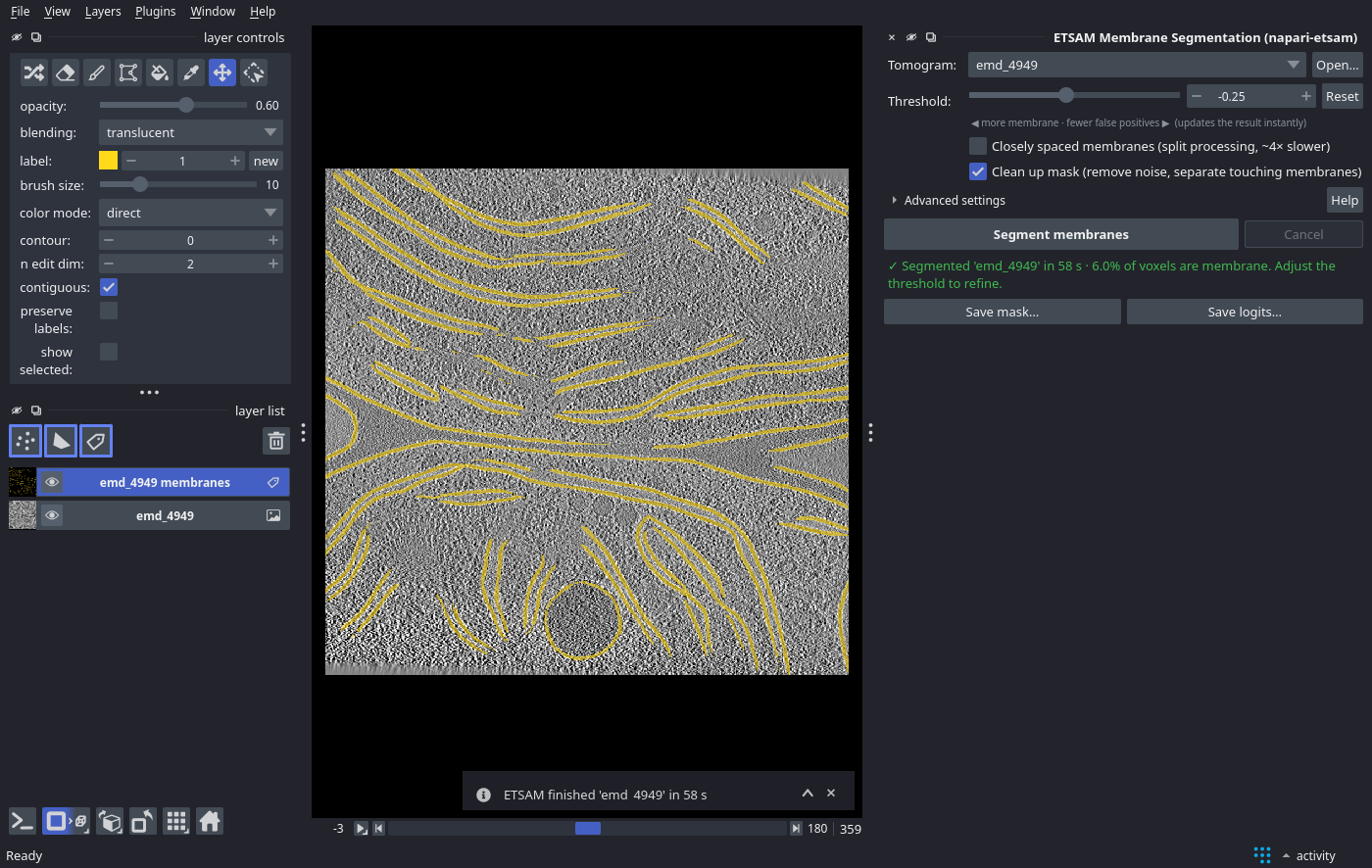\n\n*ETSAM membrane mask (yellow) on EMD-4949 in napari, with the ETSAM panel on the right.*\n\n## Requirements\n\n| | Minimum | Recommended |\n| --- | --- | --- |\n| GPU | NVIDIA GPU with 2 GB VRAM | NVIDIA GPU with 4 GB+ VRAM |\n| RAM | 4 GB | 8 GB |\n| Operating system | **Linux or Windows, with an NVIDIA GPU** | |\n\n## Installation\n\n### 1. Install the plugin\n\n**From napari (recommended):**\n\n1. Install napari if you don't have it yet. The [napari bundle](https://napari.org/stable/tutorials/fundamentals/installation_bundle_conda.html) is the easiest option.\n2. In napari, open **Plugins ▸ Install/Uninstall Plugins…**.\n3. Search for **ETSAM**, click **Install** next to *napari-etsam*, and restart napari.\n\n**With pip**, in napari's Python environment:\n\n```bash\npip install napari-etsam\n```\n\n> **Tip**\n> To install the plugin from a checkout of the [ETSAM repository](https://github.com/jianlin-cheng/ETSAM) instead, use the Python of napari's environment:\n>\n> ```bash\n> /path/to/napari/python -m pip install ./ETSAM/external_plugins/napari-etsam\n> ```\n\n### 2. First start: click Install ETSAM\n\nETSAM itself runs in its own environment, separate from napari. When you open the ETSAM panel, the plugin checks whether ETSAM is installed. If it is missing on a supported computer, the panel shows an **Install ETSAM** button. Click it to start the [ETSAM installer](https://jianlin-cheng.github.io/ETSAM/installation/#method-1-etsam-installer-recommended). Opening the panel does not start an installation.\n\nInstallation downloads about **5 GB** and may take **10–15 minutes**. Keep napari open until it finishes; the panel shows progress. The installer puts ETSAM into `~/etsam_env` (on Windows, `%USERPROFILE%\\etsam_env`). Subsequent use starts immediately.\n\nETSAM requires **Linux or Windows and an NVIDIA GPU**. macOS is not supported. Contributions are welcome to extend hardware/software support.\n\n## Segmenting a Tomogram\n\n1. **Open the panel**: **Plugins ▸ ETSAM Membrane Segmentation (napari-etsam)**.\n2. **Open a tomogram**: drag and drop an `.mrc` file onto napari, or click **Open…** in the panel. The new layer is selected as the *Tomogram* automatically.\n3. Optionally, tick **Clean up mask** or **Closely spaced membranes** (see [Options](#options)).\n4. Click **Segment membranes**. The progress bar follows ETSAM through Stage 1 and Stage 2 slice by slice, then through clean-up. Click **Cancel** to stop at any time.\n\n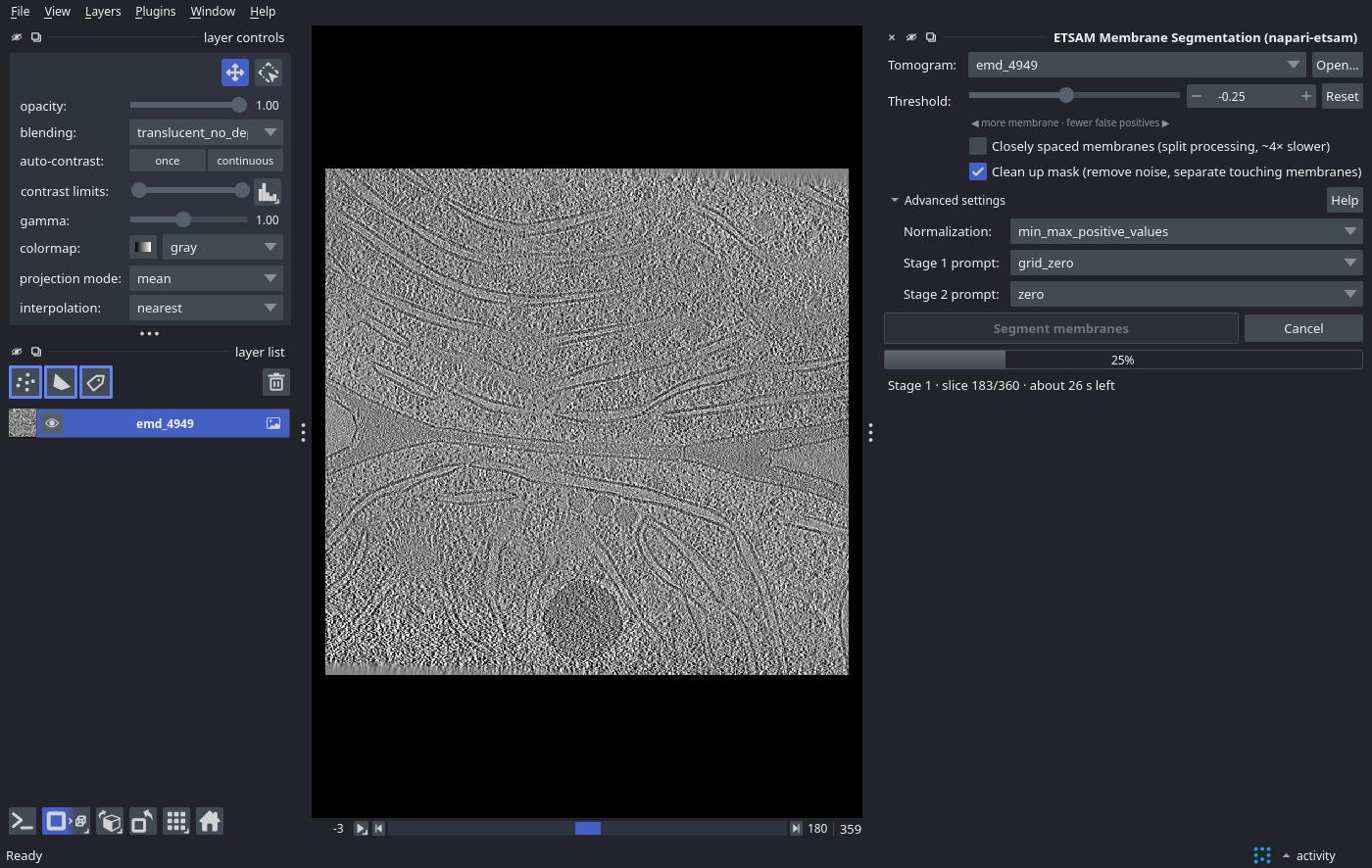\n\n*Progress is reported per slice for each stage, with an estimate of the time remaining.*\n\n5. When finished, a **` membranes`** label layer is added on top of the tomogram, and the panel shows the run time and the fraction of voxels classified as membrane.\n6. **Refine**: move the **Threshold** slider. The mask updates instantly, and clean-up is re-applied in the background if enabled. Lower values find more (and fainter) membrane; higher values give fewer false positives. **Reset** returns to the default `-0.25`. You can also correct the mask by hand with napari's label tools (paint, erase, fill).\n7. **Save**: click **Save mask…** (the mask at the current threshold, including manual edits) or **Save logits…** (raw membrane scores). Files are written as `.mrc` with the tomogram's voxel size, so they overlay directly in ChimeraX, IMOD or other tools. *File ▸ Save Selected Layers…* with a `.mrc` file name works too.\n\n## Options\n\nThe main options are in the panel. The rest are under **Advanced settings**.\n\n
\n\n# ETSAM Plugin for napari\n\nThe **napari-etsam** plugin runs ETSAM inside [napari](https://napari.org), a free image viewer for multi-dimensional data. You open a tomogram, install and activate plugin, click **Segment membranes**. The membrane mask appears as an new label layer that you can refine, inspect and save.\n\n> **Note**\n> On first start, if ETSAM is missing, click **Install ETSAM** to set it up in its own environment (or install it beforehand using the [ETSAM installer](https://jianlin-cheng.github.io/ETSAM/installation)).\n\n\n\n*ETSAM membrane mask (yellow) on EMD-4949 in napari, with the ETSAM panel on the right.*\n\n## Requirements\n\n| | Minimum | Recommended |\n| --- | --- | --- |\n| GPU | NVIDIA GPU with 2 GB VRAM | NVIDIA GPU with 4 GB+ VRAM |\n| RAM | 4 GB | 8 GB |\n| Operating system | **Linux or Windows, with an NVIDIA GPU** | |\n\n## Installation\n\n### 1. Install the plugin\n\n**From napari (recommended):**\n\n1. Install napari if you don't have it yet. The [napari bundle](https://napari.org/stable/tutorials/fundamentals/installation_bundle_conda.html) is the easiest option.\n2. In napari, open **Plugins ▸ Install/Uninstall Plugins…**.\n3. Search for **ETSAM**, click **Install** next to *napari-etsam*, and restart napari.\n\n**With pip**, in napari's Python environment:\n\n```bash\npip install napari-etsam\n```\n\n> **Tip**\n> To install the plugin from a checkout of the [ETSAM repository](https://github.com/jianlin-cheng/ETSAM) instead, use the Python of napari's environment:\n>\n> ```bash\n> /path/to/napari/python -m pip install ./ETSAM/external_plugins/napari-etsam\n> ```\n\n### 2. First start: click Install ETSAM\n\nETSAM itself runs in its own environment, separate from napari. When you open the ETSAM panel, the plugin checks whether ETSAM is installed. If it is missing on a supported computer, the panel shows an **Install ETSAM** button. Click it to start the [ETSAM installer](https://jianlin-cheng.github.io/ETSAM/installation/#method-1-etsam-installer-recommended). Opening the panel does not start an installation.\n\nInstallation downloads about **5 GB** and may take **10–15 minutes**. Keep napari open until it finishes; the panel shows progress. The installer puts ETSAM into `~/etsam_env` (on Windows, `%USERPROFILE%\\etsam_env`). Subsequent use starts immediately.\n\nETSAM requires **Linux or Windows and an NVIDIA GPU**. macOS is not supported. Contributions are welcome to extend hardware/software support.\n\n## Segmenting a Tomogram\n\n1. **Open the panel**: **Plugins ▸ ETSAM Membrane Segmentation (napari-etsam)**.\n2. **Open a tomogram**: drag and drop an `.mrc` file onto napari, or click **Open…** in the panel. The new layer is selected as the *Tomogram* automatically.\n3. Optionally, tick **Clean up mask** or **Closely spaced membranes** (see [Options](#options)).\n4. Click **Segment membranes**. The progress bar follows ETSAM through Stage 1 and Stage 2 slice by slice, then through clean-up. Click **Cancel** to stop at any time.\n\n\n\n*Progress is reported per slice for each stage, with an estimate of the time remaining.*\n\n5. When finished, a **` membranes`** label layer is added on top of the tomogram, and the panel shows the run time and the fraction of voxels classified as membrane.\n6. **Refine**: move the **Threshold** slider. The mask updates instantly, and clean-up is re-applied in the background if enabled. Lower values find more (and fainter) membrane; higher values give fewer false positives. **Reset** returns to the default `-0.25`. You can also correct the mask by hand with napari's label tools (paint, erase, fill).\n7. **Save**: click **Save mask…** (the mask at the current threshold, including manual edits) or **Save logits…** (raw membrane scores). Files are written as `.mrc` with the tomogram's voxel size, so they overlay directly in ChimeraX, IMOD or other tools. *File ▸ Save Selected Layers…* with a `.mrc` file name works too.\n\n## Options\n\nThe main options are in the panel. The rest are under **Advanced settings**.\n\n \n\n| Option | Command-line equivalent | Description |\n| --- | --- | --- |\n| Threshold | `--logit-threshold` | Binarization threshold of the Stage 2 logits (default `-0.25`). Adjustable live after a run. |\n| Closely spaced membranes | `--split-processing` | Segments the four Y/X quadrants separately with a denser prompt grid; separates closely apposed membranes. About 4× slower. |\n| Clean up mask | `--post-process` | Removes thin noise blobs and cuts short bridges between parallel membranes, with the default [post-processing](https://jianlin-cheng.github.io/ETSAM/advanced/#post-processing-with-etsam-postprocess) settings. Compare with the raw result, because it can remove small real membranes. |\n| Normalization | `--normalize-method` | Try *Softplus* if membranes are missed with the default. |\n| Stage 1 / Stage 2 prompt | `--stage1-prompt`, `--stage2-prompt` | Prompting strategies; see [Advanced Usage](https://jianlin-cheng.github.io/ETSAM/advanced/#prompt-methods). |\n\nThe plugin and the `etsam` command produce the same results for the same settings.\n\n## Troubleshooting\n\nWhen something goes wrong, the panel shows a red box with the problem and a suggested fix. **Show details** displays the full error, and **Copy error report** copies it with your system information (versions, GPU) for a [GitHub issue](https://github.com/jianlin-cheng/ETSAM/issues).\n\n
 \n\n| Message | What to do |\n| --- | --- |\n| *No tomogram selected* | Open an `.mrc` file first (drag and drop, *File ▸ Open* or **Open…**). |\n| *This layer cannot be segmented* | ETSAM needs a single 3D grayscale volume (Z, Y, X). Select the tomogram layer rather than a 2D image, RGB image or a time series. |\n| *Installing ETSAM failed: … requires an NVIDIA GPU* | The installer supports NVIDIA GPUs only. Install ETSAM yourself as described in [Installation](https://jianlin-cheng.github.io/ETSAM/installation/#method-2-conda-environment-from-source). |\n| *Installing ETSAM failed: … the folder already exists* | An earlier installation was interrupted. Delete the `etsam` folder in your home folder and reopen the panel. |\n| *ETSAM is not installed* | This computer is not supported by the installer. Install ETSAM yourself (see [Installation](#installation)), or set `ETSAM_PYTHON`. |\n| *ETSAM is not installed in the environment …* | That environment lacks ETSAM. Run step 3 of the conda installation (`pip install --no-deps -e .` in the ETSAM folder). |\n| *ETSAM … is older than this plugin* | The plugin needs an ETSAM at least as new as itself. Click **Update ETSAM**: it installs the latest ETSAM release again (about 3 GB download, 10–15 minutes). An ETSAM you installed from source must be updated the same way (`git pull`, then `pip install --no-deps -e .`). |\n| *Running on CPU (no GPU: this will be slow)* although the computer has an NVIDIA GPU | Update the NVIDIA driver, and check that PyTorch in the `etsam` environment can use the GPU (see [Verify the Installation](https://jianlin-cheng.github.io/ETSAM/installation/#4-verify-the-installation)). |\n| *The GPU is busy* | Another program keeps ETSAM from using the GPU. Close other programs that use the GPU, or restart napari. |\n| *Out of memory* | Close other programs (especially ones using the GPU) and try again, or bin the tomogram (fewer slices need less RAM). |\n| *Could not download the ETSAM model weights* | Check your internet connection or proxy and retry. Offline machines: copy `etsam_stage1_v1.pt` and `etsam_stage2_v1.pt` into the weights folder (see [Model Weights](https://jianlin-cheng.github.io/ETSAM/installation/)). |\n| Empty or incomplete mask | Lower the threshold, try *Softplus* normalization, a `grid` Stage 1 prompt, or *Closely spaced membranes*. See [Troubleshooting](https://jianlin-cheng.github.io/ETSAM/troubleshooting/#empty-or-incomplete-membrane-predictions). |\n| *ETSAM stopped unexpectedly* | Report it with **Copy error report**. |\n\n## Uninstalling\n\nRemove the plugin with **Plugins ▸ Install/Uninstall Plugins ▸ napari-etsam ▸ Uninstall**, or `pip uninstall napari-etsam`. To remove ETSAM completely, refer uninstall section in [Installation](https://jianlin-cheng.github.io/ETSAM/installation/#3-uninstall-etsam) guide.\n\n# Cite:\n\nSelvaraj, J., Cheng, J. ETSAM: effectively segmenting cell membranes in cryo-electron tomograms. *Nat Commun* (2026). [https://doi.org/10.1038/s41467-026-77962-7](https://doi.org/10.1038/s41467-026-77962-7)\n","description_content_type":"text/markdown","keywords":"napari,cryo-ET,tomography,membrane segmentation,SAM2","home_page":null,"download_url":null,"author":null,"author_email":"Joel Selvaraj ","maintainer":null,"maintainer_email":null,"license":null,"classifier":["Development Status :: 4 - Beta","Framework :: napari","Intended Audience :: Science/Research","Operating System :: POSIX :: Linux","Operating System :: Microsoft :: Windows","Programming Language :: Python","Programming Language :: Python :: 3","Programming Language :: Python :: 3 :: Only","Programming Language :: Python :: 3.11","Programming Language :: Python :: 3.12","Programming Language :: Python :: 3.13","Programming Language :: Python :: 3.14","Topic :: Scientific/Engineering :: Bio-Informatics","Topic :: Scientific/Engineering :: Image Processing"],"requires_dist":["mrcfile>=1.5","numpy","qtpy","superqt>=0.6","napari[all]; extra == \"all\""],"requires_python":">=3.11","requires_external":null,"project_url":["Homepage, https://github.com/jianlin-cheng/ETSAM","Documentation, https://jianlin-cheng.github.io/ETSAM/napari/","Bug Tracker, https://github.com/jianlin-cheng/ETSAM/issues","Source Code, https://github.com/jianlin-cheng/ETSAM/tree/main/external_plugins/napari-etsam"],"provides_extra":["all"],"provides_dist":null,"obsoletes_dist":null},"npe1_shim":false}